
Skip to content
TopLeft
Menu

Autotask

Drag cards between member swimlanes in Autotask

Kanban for Autotask users can now assign or re-assign tickets and tasks by dragging cards between member swimlanes.
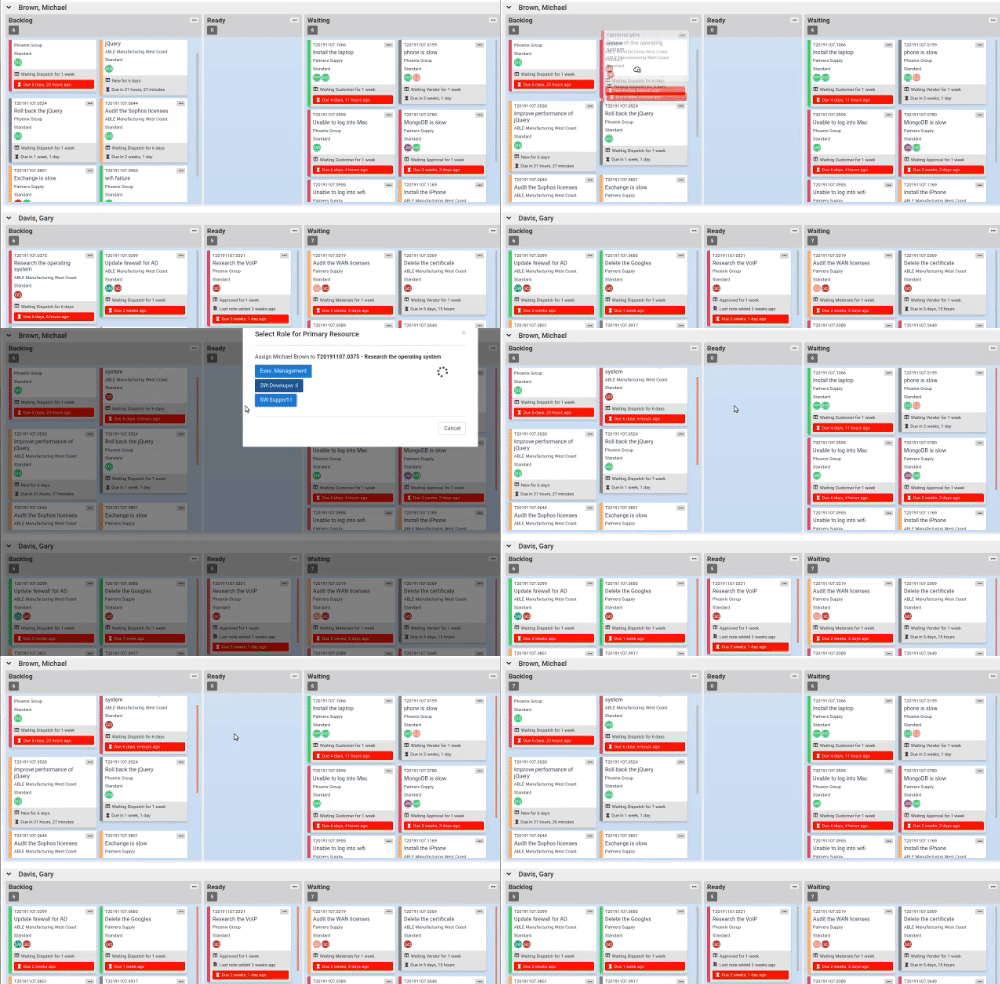
Dragging a card to a member swimlane changes the ticket or task's primary assignment. If the technician has multiple possible roles for the ticket, you'll be shown a prompt to select the role. Dragging to the "no assigned resource" swimlane removes the primary and all secondary resources.

Learn more in the knowledgebase.

Comments

    The first time, we email you a link to confirm. After that, this browser remembers you.

    Like

    We email you a link once. After you click it, this browser remembers you on every docs page.

    Feedback on this page

    Fix or keep
    What kind

    Tip: select words on the page before you open this, and they come with your note.

    Optional, up to 5. Paste into the box above, or drop them here.

      They go into the GitLab issue. Crop out anything private.

      See every note and what happened to it