
Autotask
Ticket SLAs available for Autotask
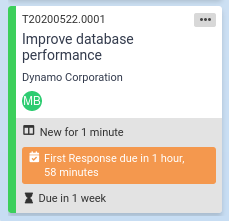
You can now view SLA info on Autotask tickets. This helps Autotask customers take SLA times into account when prioritizing tickets and improves SLA success rate by focusing on tickets whose SLA is approaching.
Here's an example of a ticket whose SLA is approaching:
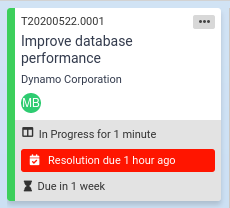
And here's how it appears if the SLA time has passed:
To highlight tickets when the SLA ends within a certain period of time, edit the Kanban board and check the SLA time field and set the SLA warning field for the appropriate column. You can set a different threshold for each column. The syntax for the field is "Xm" for a threshold in minutes, "Xh" for a threshold in hours, and "Xd" for a threshold in days. For example, to highlight tickets whose SLA ends in 2 hours or less, enter "2h" or "120m".
When the ticket is in a status where the SLA is paused, the label is "SLA Waiting Customer".
To learn more, visit the knowledgebase.
Comments
No comments yet.