
Skip to content
TopLeft
Menu

ConnectWise

Showing next step on ConnectWise sales opportunities

Sales reports in ConnectWise show the next activity for each opportunity. Now you can show the same information on opportunity cards in Kanban.
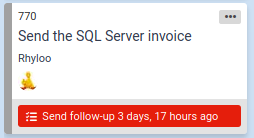
Showing the next activity in Kanban helps your sales folks stay aware of their to-dos and quickly identify when scheduled activities have been missed.

To enable this option on sales boards, enable the "Next step" option under "Card fields".

Comments

    The first time, we email you a link to confirm. After that, this browser remembers you.

    Like

    We email you a link once. After you click it, this browser remembers you on every docs page.

    Feedback on this page

    Fix or keep
    What kind

    Tip: select words on the page before you open this, and they come with your note.

    Optional, up to 5. Paste into the box above, or drop them here.

      They go into the GitLab issue. Crop out anything private.

      See every note and what happened to it