
WIP limits for individual technicians
You can now set Work In Progress (WIP) limits that apply to each technician on your team, instead of the Kanban board as a whole. You can also apply the limits to projects, priorities, boards or queues, or any type of swimlane.
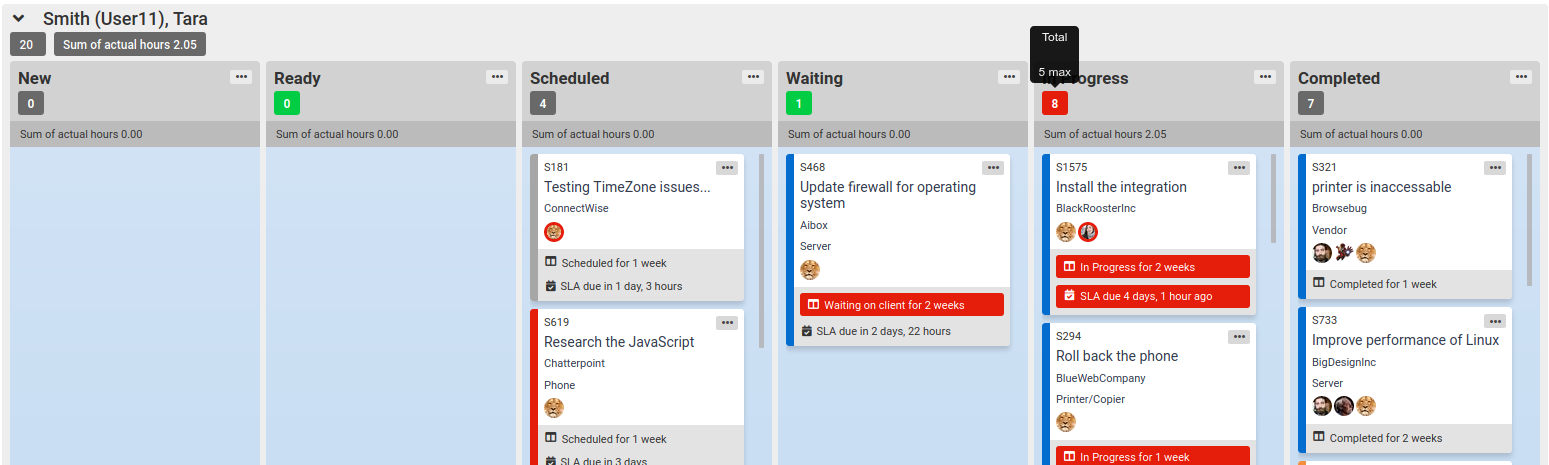
This helps you ensure work stays evenly distributed in your team. You could always apply a limit to the Kanban board as a whole, indicating when your whole team had exceeded the limit in a column. But this wouldn't help you catch cases where one technician had too much WIP but other technicians had less WIP and so it all averaged out.
Now you can more easily see when just one of your technicians has too much WIP- because even a single technician with too much WIP can slow down your team's overall velocity.
This option also calculates the whole-board WIP limit automatically by setting the board limit to (per-swimlane limit) * (# of swimlanes). This means you don't need to adjust the board WIP limit when you change the number of people on your team.
To make column WIP limits apply to swimlanes instead of the whole board, on the board edit page on the General tab, just enable the "WIP limits per swimlane" option.
Comments
No comments yet.