
Ticket and Project Budget Warnings
TopLeft can now help you identify tickets and projects whose number of logged hours are approaching their budget hours.
You can specify a threshold as a percentage of the budget. For example, using a threshold of 80% would show a warning on a 4 hour ticket when the logged hours were between 3.2 and 4.
When a ticket or project exceeds the warning threshold, the card appears with a warning label like this:
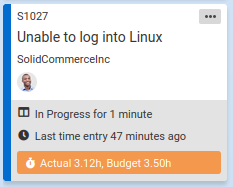
Then you and your teammates can pay close attention to the work to ensure it is completed before reaching the budget.
As always, when a ticket or project exceeds its budget, the hours are shown in red as an error.
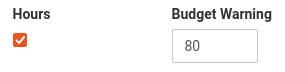
Budget thresholds are set separately for each column on a board. To set a threshold, edit the board, then on the Columns tab click Advanced Options and look for these fields:
Comments
No comments yet.