
ConnectWise
Streamlining Repetitive Tasks in TopLeft
You might be doing repetitive tasks in TopLeft. For example:
- If you're a dispatcher, you need to dispatch many tickets at once. You assign or schedule a technician, then change the ticket status to Ready, then close the editor.
- If you're a technician, you need to enter time or a note on many tickets throughout the day, then change the ticket status to Completed, then close the editor.
To make these tasks easier, we've introduced buttons that perform your main action (assigning or scheduling a technician, or entering time), change the ticket's status, and close the editor- all in a single click.
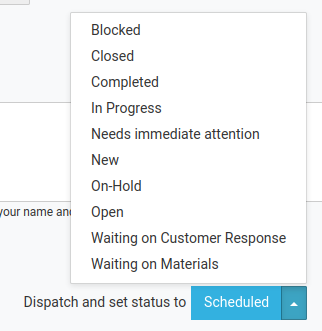
In the example above, the dispatch form has already been completed. Clicking Scheduled will dispatch the technician, change the ticket's status to Scheduled, and close the editor. Or instead of clicking Scheduled, clicking the arrow will show all the other statuses, and clicking one will perform all the actions and set the ticket to that status- and save the status selection so it's the default choice next time.
This applies to ConnectWise customers only for now. This feature will be available for Autotask customers when we launch the new editor (soon!).
Comments
No comments yet.