
Your User Defined Fields available in TopLeft's New UI
The legacy TopLeft UI supports User Defined Fields (UDFs) from your PSA and now the new TopLeft UI supports them too.
Our new UI offers UDFs in three contexts:
- Showing as labels on cards
- Grouping of records
- Automatic ordering of cards in columns
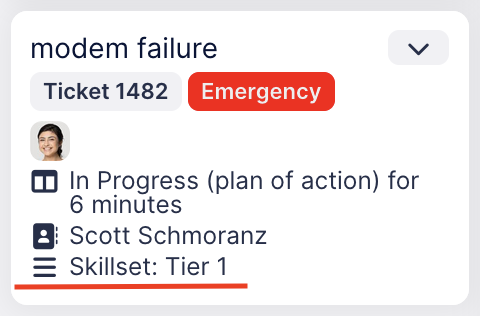
Here's an example of how UDFs appear on a card on a Kanban board.
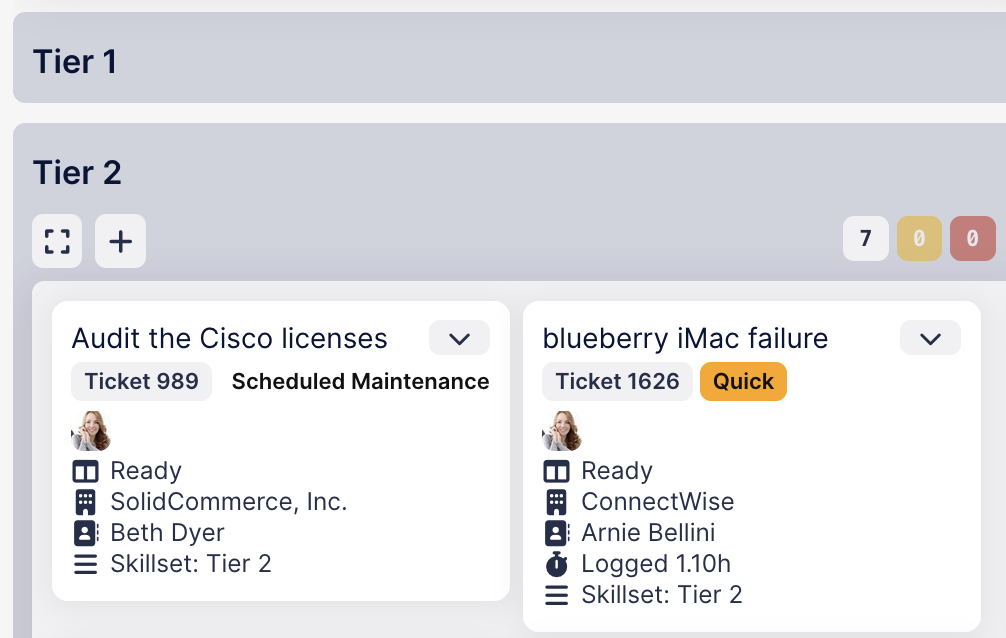
Here's how UDFs appear as a grouping field:
This is configured on the view editing page by selecting a UDF in the Card Fields list, Automatic Ordering field, or Default Grouping field. UDFs are indicated by "(UDF)" after the field name.

UDFs are supported for ConnectWise, Autotask, and HaloPSA.
We plan further support for UDFs in the not-too-distant future: offering UDFs as rules in the view query builder (this work is in progress already) and editing of UDFs in the ticket editing screen.
Comments
No comments yet.