
TopLeft Improvements - June 2026
Here's a summary of what we shipped in TopLeft during June 2026. It was a big month, headlined by Conditional Formatting and the new Project Health tool, plus a batch of smaller improvements.
Conditional Formatting (available by request)
Style your board cards based on rules you define, so the cards that need attention stand out at a glance.
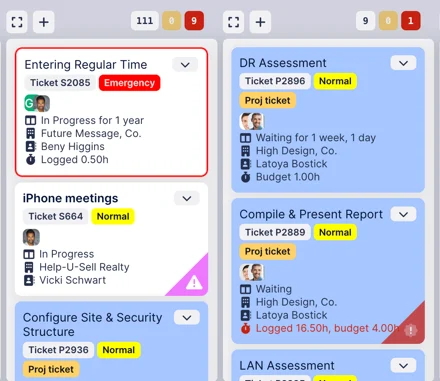
- Formatting options include card background, left border, outline, ribbon, icons, and tooltips — with dark-mode support.
- Per-stage overrides, and rule matching that works independently of your board's filters.
- Formatting can key off a growing set of fields, including ConnectWise Agreement/Agreement Type, Opportunity, and Subtype/Item.
Read about it in the knowledgebase.
At the moment this is available by request. Just email help@topleft.team We anticipate launching it in July.
Project Health board (available by request)
A new read-only Project Health board on project-overview views, alongside Kanban, Gantt, and Capacity Planning — computed from your already-synced PSA data.
- Health signals for Schedule, Budget, Activity, Margin, and Milestones, rolled into a composite score.
- Your column selection is remembered per view.
- A View project health shortcut on each project card's menu.
This is also available by request.
ConnectWise
- New Opportunity field on tickets: an editor dropdown that writes back to ConnectWise, plus filtering, swimlane grouping, card labels, and conditional formatting.
- Subtype and Item are now available as card fields, filters, and swimlane groups (mirroring Type).
- Filter and group tickets by Agreement and Agreement Type.
- Filter projects by Manager.
- Service vs. project tickets are now prefixed S / P on cards in the new UI (e.g. “Ticket S1234”).
Autotask
- A new Hours card field on tickets and tasks showing logged vs. estimated hours.
Gantt
- Export Gantt to PDF — one-click, multi-page PDF of your Gantt you can print or send on to your colleagues.
Comments
No comments yet.