
Show schedule details on cards
If you schedule a lot of work into technicians' calendars, it can be helpful to see the details of the schedules directly on the Kanban cards. Now you can do that in TopLeft Kanban:
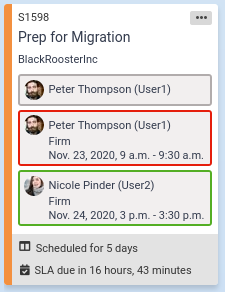
As with the compact view of assignments, the border of the assignment indicates when it occurs:
- Grey outline: the member is assigned without a calendar appointment
- Blue outline: the assignment is for tomorrow or further in the future
- Green outline: the assignment is today
- Red outline: the assignment occurred in the past
Administrators can enable this view by enabling the "Assignment details" option on the Kanban board. If the option is not enabled, assignment details can still be seen by hovering over the member's icon.
Comments
No comments yet.