
Ticket checklists available
TopLeft now supports ticket checklists! ConnectWise users need to grant us some new permissions so please read all the way to the end.
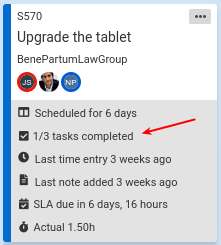
Checklists allow tickets to define a specific series of steps that must be accomplished before the ticket is complete. To track progress, individual checklist items can be marked as done.
In ConnectWise, ticket checklists are called tasks, while in Autotask they're simply called checklists. Unfortunately, checklists are only available in the Autotask API for service tickets, not project tasks, so project task checklists are not available in TopLeft.
To show the number of completed and total checklist items on a ticket, edit the Kanban board and enable the "ticket tasks" (ConnectWise terms) or "checklist items" (Autotask terms) options.
To edit the checklist, including marking items as done, click a ticket's "..." menu, then click "Tasks" (ConnectWise terms) or "Checklist items" (Autotask terms).
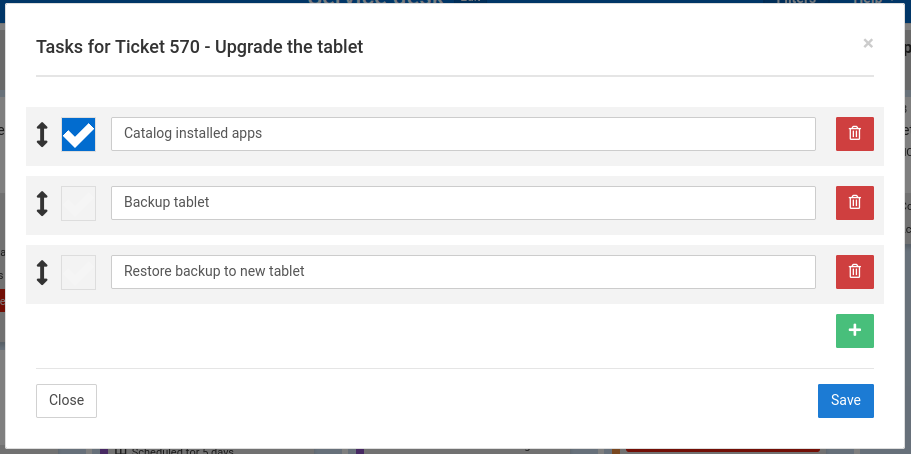
You can add, change, or remove items, and mark items as done.
Checklists are available in Standard plan.
New ConnectWise permissions needed
For this functionality, ConnectWise customers need to grant the TopLeft API member these additional permissions:
- Service Desk/Service Tickets: all permissions must be set to All
- Project/Project Ticket Tasks: all permissions must be set to All
See the knowledgebase for more details on setting up API permissions.
Comments
No comments yet.