
Create Tickets in Client Portal
Your client portal users can now create tickets, tasks, or issues! This can make it a lot easier for your clients to request services, because they can create tickets in the same place they're already reviewing existing tickets.
On Kanban boards with project or phase swimlanes, clients can create project tickets/tasks. On boards with other types of swimlanes, or with no swimlane, then they create service tickets.
For example, here's how a client could create a project ticket:
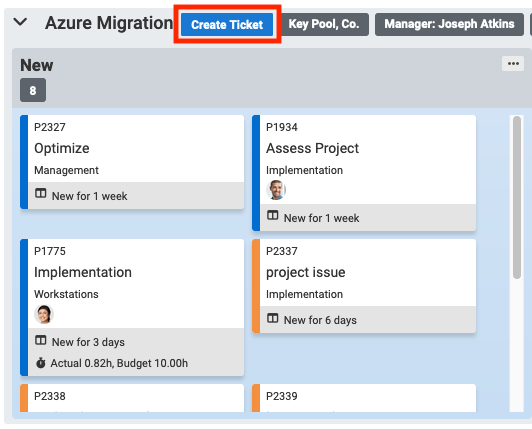
After clicking Create Ticket in the Azure Migration swimlane, the user will see this form:
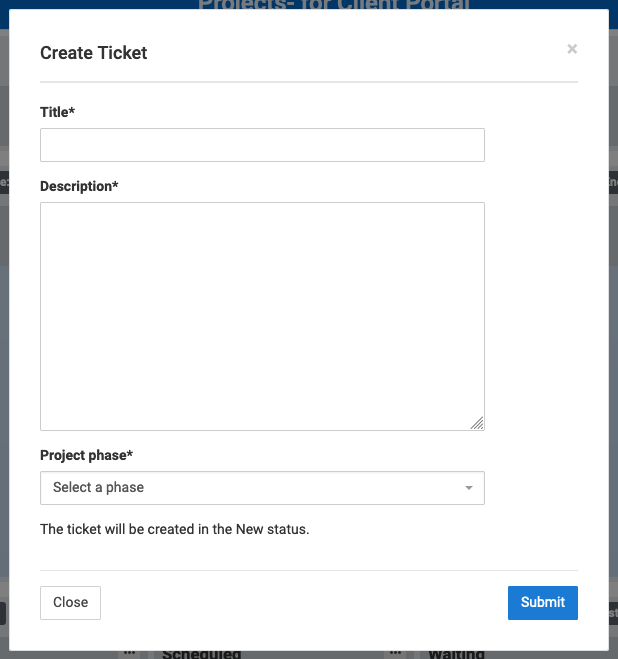
The ticket would be created within the Azure Migration project, in the phase selected by the client. The status of the ticket is set by an administrator, so all new tickets start out in the same status where they can be regularly reviewed or processed by an automated workflow in your PSA.
Administrators can enable ticket creation using the options on the board edit page. For more info, read the knowledgebase page.
Comments
No comments yet.