
Filtering Views with User Defined Fields
Views in the new TopLeft UI can be filtered using User Defined Fields (UDFs), aka Custom Fields, from your PSA.
You can use this to show tickets on a Kanban board that match a user defined field value in the PSA. For example:
- In a text field for required skillset, you can include tickets where skillset includes "azure" (see screenshot below).
- In a numeric field for customer rating, you can include tickets with a value less than 3.0.
- In a date field for request date, you can include tickets where the request date was more than 7 days ago.
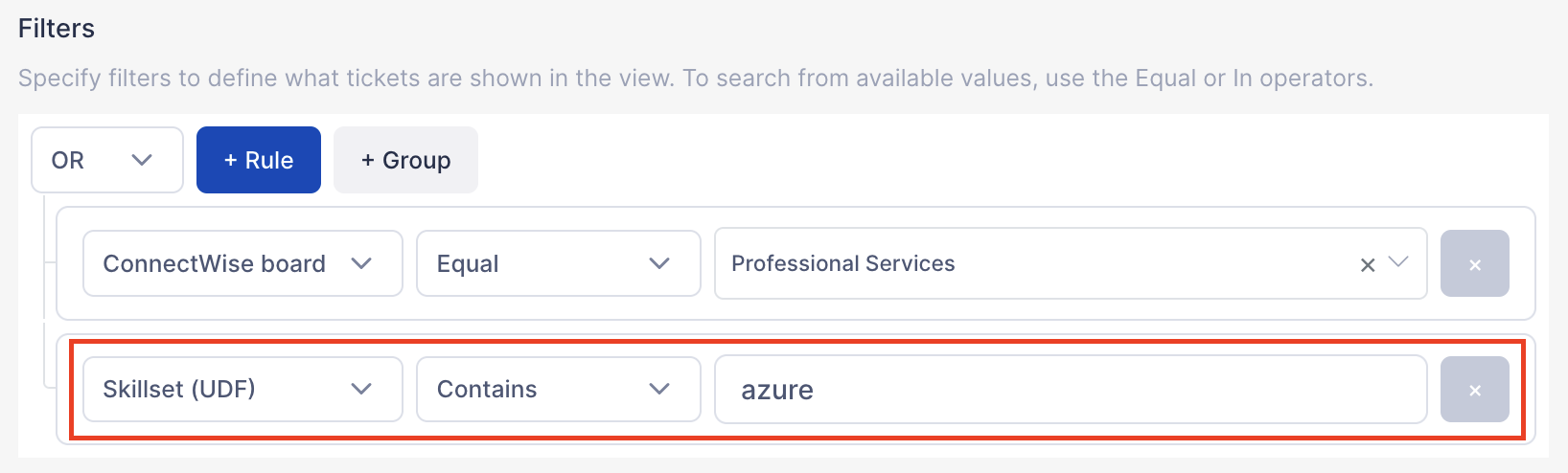
UDF filtering generally works for strings, numbers, and date fields.
As a reminder, UDFs can be used in a few ways in TopLeft: they can be shown on cards, be used in automatic ordering within columns or grouping in swimlanes, and now they can be used in filtering.
Comments
No comments yet.