
Conditional Formatting (aka Style Profiles)
You can now highlight special work in your team according to your own custom rules. We call this Conditional Formatting. It replaces Style Profiles in the old UI.
With Conditional Formatting you can change the background color of cards, change the left bar color, give cards an outline, add a design in the bottom-right corner, or a custom label.
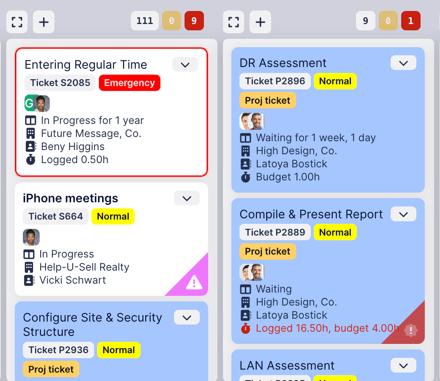
For example, in the image above, project tickets have a blue background, Emergency priority tickets have a red outline, and tickets from Help-U-Sell Realty have a purple "ribbon" in the bottom-right corner with an exclamation point icon.
You can customize the format for dark mode too.
To learn how to set this up or to watch a video demonstration, refer to the knowledgebase article about Conditional Formatting.
Comments
No comments yet.