
Skip to content
TopLeft
Menu
Browse the docs

Where can we view schedules?
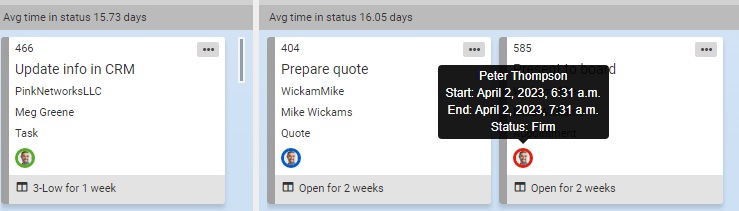
Scheduling TL

Schedules are indicated on ticket cards. The indicator around the assigned person's name will be outlined in blue for future meetings, green for today's meetings, and red for past meetings. You can also hover over the indicator to view the time and date details. Additionally, there is an option to display the details directly on the ticket card without hovering over it. 

See Can you schedule tickets and projects? for more details and a video explanation.

Updated September 23, 2026

Comments

    The first time, we email you a link to confirm. After that, this browser remembers you.

    Like

    We email you a link once. After you click it, this browser remembers you on every docs page.

    Feedback on this page

    Fix or keep
    What kind

    Tip: select words on the page before you open this, and they come with your note.

    Optional, up to 5. Paste into the box above, or drop them here.

      They go into the GitLab issue. Crop out anything private.

      See every note and what happened to it