
ConnectWise Boards Don't Appear in TopLeft
Why a ConnectWise board might be missing from TopLeft, from the board sync setting to API member access restrictions.
Legacy interface
If you notice that a ConnectWise board is not present in TopLeft, review the possible causes below to determine why the board might be missing.
Board Not Configured to Sync In TopLeft
If the board doesn't appear in the ConnectWise boards filter tab on your board edit page, it might be hidden by the board sync setting. Read about how to change this setting.
Board Not Fetched Due to Access Restriction
In some cases, the ConnectWise security role and API member can be configured correctly but other access restrictions in ConnectWise prevent the board from being fetched by TopLeft.
You can check if additional restrictions are in place in ConnectWise by navigating to System > Members > API Members, then selecting your TopLeft API member.
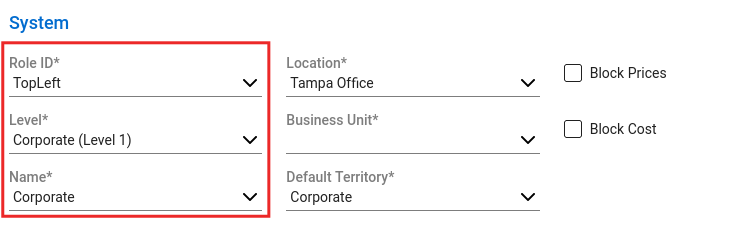
In the System section, ensure that:
Role ID is set to your TopLeft security role.
Level is set to Corporate (Level 1).
Name is set to Corporate.
Location, Business Unit, and Default Territory set default values for any records the member creates and don't restrict access to ConnectWise boards.
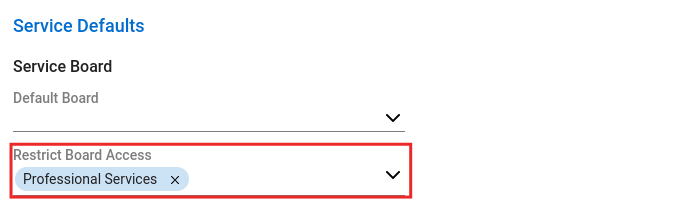
In the Service Defaults section, verify that:
- the missing board is not selected in the Restrict Board Access setting.
Board Not Fetched Due to a Synchronization Error
Review Data Sync Isn't Working Properly to see if there are errors during synchronization tasks. If there are sync jobs for ConnectWiseBoards that have failed, then click the job's ID to view the error message.
If you're still unable to find the missing board, let us know by opening a support ticket.
Updated September 23, 2026