
Week 11: Emphasize Neglected Work
Set thresholds that highlight tickets sitting too long in a status or without a recent note or time entry.

Time required: 1 hour
Last week you set WIP limits to alert when the amount of work in progress is too high or low. This week you'll set indicators to highlight work that's neglected. Your team will be able to see at a glance where tickets are getting stale and where bottlenecks occur.
Discuss in your team the thresholds for what makes work neglected. The SDM should have ideas about thresholds because he or she has been monitoring work for a number of weeks already.
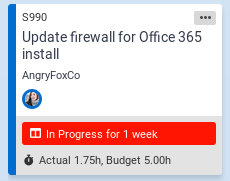
The above image is an example of ticket with a neglected work warning in TopLeft.
In TopLeft you can use the following ticket fields to indicate when work is neglected.
- Length of time in status
- Time since last time entry
- Time since last note
If highlighting the field on the card isn't attention-getting enough for you, there are style profile conditions that can be used to, for example, turn the entire card a different color when the ticket exceeds the threshold set in the column.
Thresholds are configured separately for each column. Here are guidelines for key columns:
- In progress: for service teams working on small tickets, 4 hours; for project teams working on larger tickets, 2 or 3 days
- Scheduled: no thresholds
- Blocked: 7 days
- Ready: 7 days
- Backlog: for service teams where backlog tickets are triaged immediately into a Ready column, 1 hour; for project teams there may be no maximum for this column.
In your daily meeting, review tickets that violate the thresholds. The SDM should use these thresholds when looking for neglected work.
Review the thresholds after a week and make changes if necessary.
Next up: The final week
Updated September 23, 2026
Comments
No comments yet.