
How do I update tickets?
Change a ticket's fields from the Edit Ticket option in the card menu.
Legacy interface
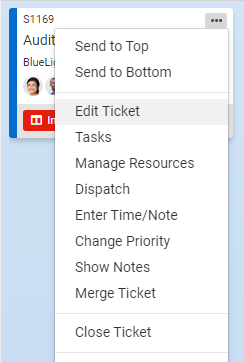
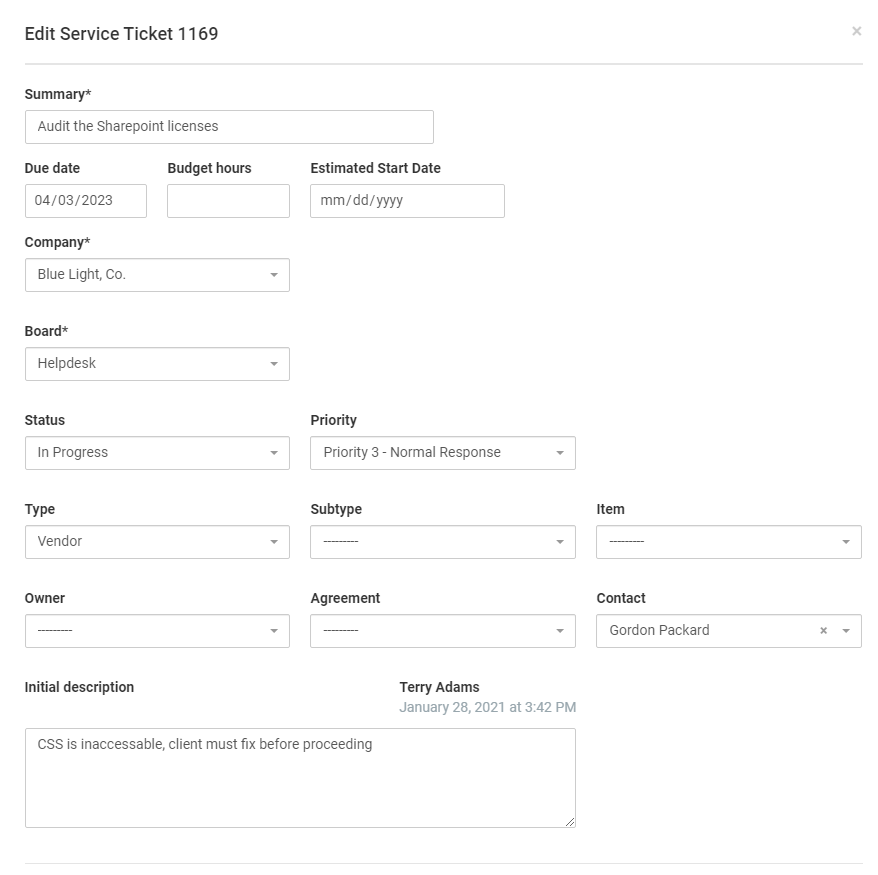
To update tickets in TopLeft, you can follow these steps:
- Identify the ticket that you want to update on the Kanban board.
- Click on the menu on that ticket. The menu is represented by three dots.
- From the menu, select the option for "Edit Ticket".
- This will open a form where you can make changes to various fields, such as the title, budget hours, due date, categorizations such as type of ticket, or other relevant information related to the ticket.
- Make the desired changes in the form.
- Save your changes.
Additionally, you also have options to edit tasks or checklist items associated with the ticket, as well as assign or reassign people to the ticket.
Updating tickets in TopLeft allows you to modify the ticket details, add additional information, or make corrections as needed to keep the ticket information accurate and up-to-date throughout the ticket's lifecycle.
See also:
Updated September 23, 2026